Skip to content
Resetting an ice maker sounds simple, but many people struggle with it—especially when the ice maker is hidden inside a fridge or has a confusing reset process. If your ice maker stops working, makes too much ice, or produces odd-shaped cubes, a reset is often the first and easiest solution.
But the right reset steps depend on the brand, model, and type of ice maker you have. This guide will walk you through everything you need to know to reset your ice maker safely, avoid common mistakes, and get your ice flowing again.
Understanding How Ice Makers Work
Before you start pressing buttons or unplugging wires, it helps to know the basics. An ice maker is a small machine—often inside your freezer—that fills a mold with water, freezes it, and drops the cubes into a bin. Most modern ice makers have a control module that manages the cycle.
There are three main types:
- Automatic/freezer ice makers: Built inside the freezer compartment of a refrigerator.
- Portable countertop ice makers: Standalone units you can move around.
- Undercounter/standalone ice makers: Permanent fixtures, often found in bars or kitchens.
Knowing your type is important because reset steps can be different. For example, resetting a Samsung fridge ice maker is not the same as resetting a portable Igloo ice maker.
Common Reasons To Reset An Ice Maker
Resetting is not always the answer, but it’s often the first thing to try if you notice:
- Ice maker not producing ice at all.
- Making too much or too little ice.
- Odd-shaped, cloudy, or hollow ice cubes.
- Ice is stuck in the tray.
- Red or blinking indicator light on the ice maker.
- Reset required after power outage.
A reset can clear small faults, fix memory errors, or help the ice maker recognize a new water supply. But if you have a leak, strange noises, or water damage, stop and call a technician.
Credit: www.youtube.com
How To Reset An Ice Maker: Step-by-step
Resetting your ice maker is usually quick. But the process depends on your type and brand. Here are the main steps, with tips to avoid common mistakes.
1. Check The Manual And Model Number
The most overlooked step is reading the manual. Find the model number (usually on a sticker inside the freezer or behind the ice bin). Search online for the manual if you lost yours. The manual will show you the exact location of the reset button or lever.
2. Safety First: Unplug The Appliance
Never reset or touch inside an ice maker while it’s powered and running. Unplug your refrigerator or ice maker unit. For built-in models, switch off the circuit breaker if you can’t unplug it easily. Wait 2-3 minutes before starting.
3. Locate The Reset Button Or Switch
Most ice makers have a reset button. But the location varies:
- Inside the ice bin: Remove the bin and look for a button or small hole.
- On the ice maker module: Sometimes visible on the front or side.
- Control panel: On newer models, the reset function is in the menu.
If you see a small pinhole, use a paperclip to press it gently.
4. Press And Hold To Reset
Press and hold the reset button for 5-10 seconds. You might hear a beep or see a light flash. Release the button when you hear the sound or after 10 seconds.
On some models, you may need to press the button twice or hold for longer. If nothing happens, check the manual for model-specific instructions.
5. Reconnect Power And Wait
Plug the appliance back in or switch on the breaker. Wait for the ice maker to reset itself. This can take 5-10 minutes for most models. You should hear the water valve fill the tray or see the ice arm move.
6. Test The Ice Maker
After resetting, give it 1-2 hours to make a new batch of ice. Discard the first batch—it may contain debris or old water. If the ice maker works, you’re done. If not, try resetting one more time. Still not working?
Move to troubleshooting.
Reset Instructions For Popular Brands
Different brands have their own reset steps. Here are some brand-specific instructions to help you:
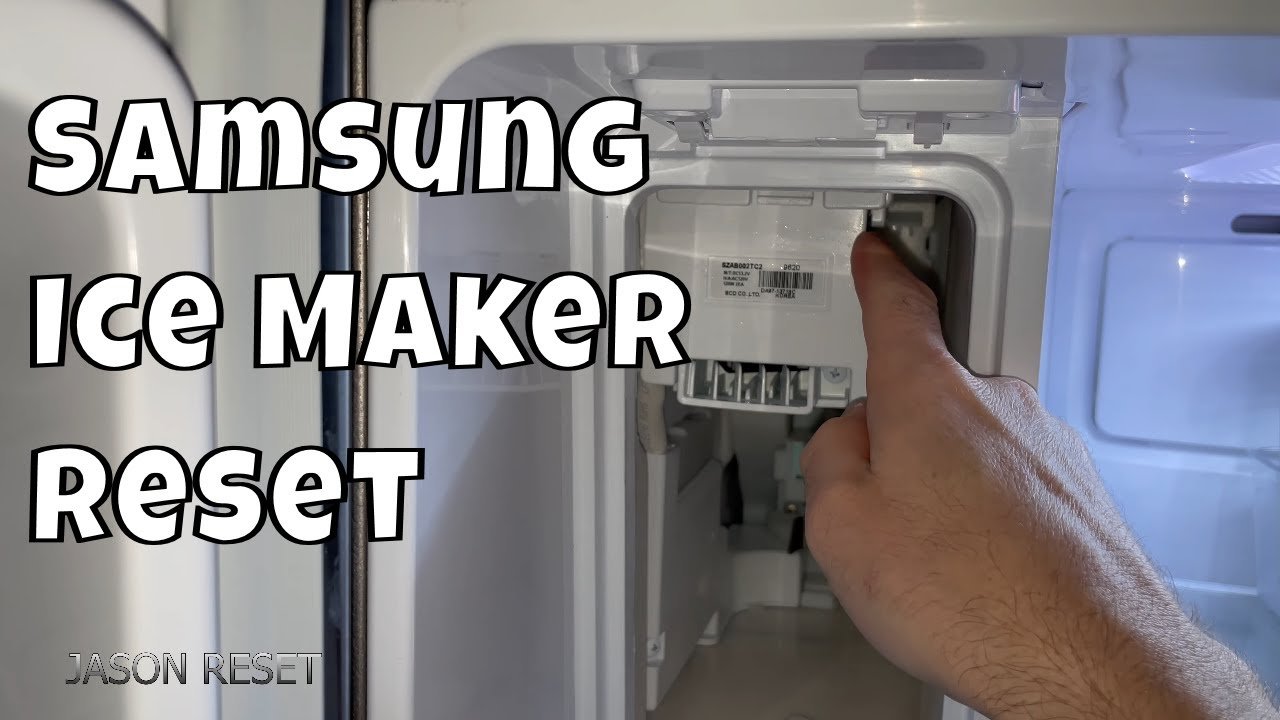
Samsung
- Remove the ice bin to access the ice maker.
- Look for a small blue reset button underneath or to the side.
- Press and hold for 8-10 seconds until you hear a chime.
- Replace the bin, close the door, and wait 24 hours for normal operation.
Whirlpool
- Open the freezer and locate the ice maker.
- Find the on/off switch or reset button on the side or bottom.
- Move the switch off for 1 minute, then back on.
- Close the freezer and wait for the ice cycle to restart.
Ge
- Remove the ice bin.
- Find the reset button on the ice maker’s side or bottom.
- Press and hold for 10 seconds until you hear a beep.
- Replace the bin and close the door.
Lg
- Open the fridge and locate the ice maker.
- Press and hold the “test” button on the ice tray for 3 seconds.
- The tray should rotate or dump ice.
- Wait for ice production to resume.
Frigidaire
- Remove the ice bin.
- Press and hold the on/off button for 3 seconds.
- Wait for the indicator light to blink.
- Replace the bin and let the ice maker cycle.
Resetting Countertop And Portable Ice Makers
Portable ice makers are popular because they’re easy to move. But they can also freeze up or stop making ice. Here’s how to reset most portable models:
- Unplug the unit.
- Empty all water and ice from the machine.
- Wait 10-15 minutes for the machine to cool.
- Plug the unit back in and fill with fresh water.
- Press the “on” or “reset” button (check manual for location).
- Wait for the ice-making cycle to start.
If your portable ice maker has a self-cleaning cycle, run it after resetting for the best results.
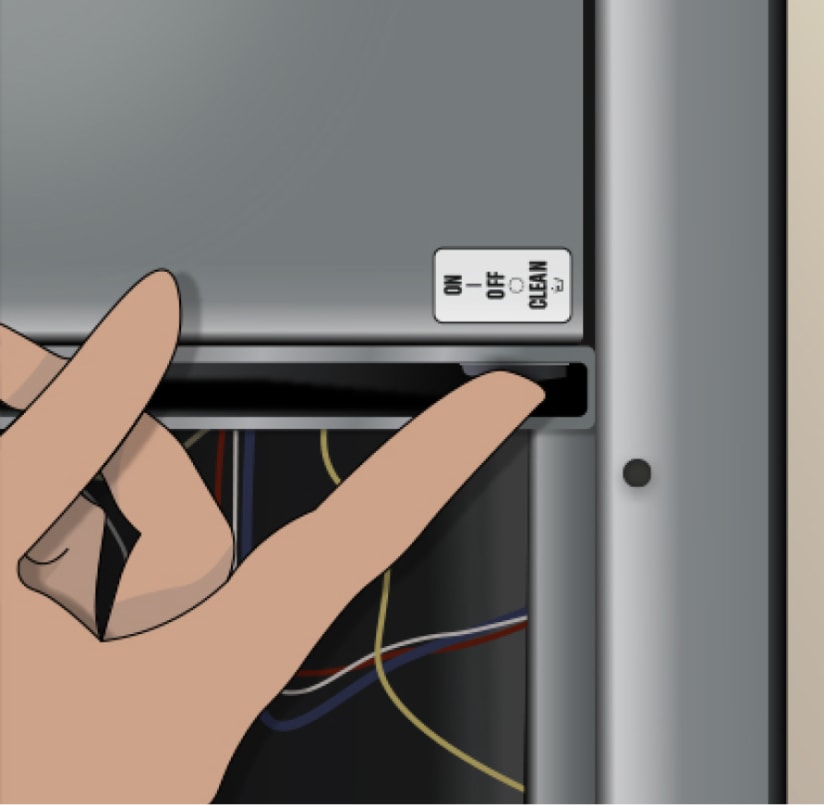
Resetting Standalone Or Undercounter Ice Makers
These ice makers are more complex, often with advanced control boards. Steps are similar, but may include:
- Switching off power at the circuit breaker.
- Holding a “clean” or “reset” button (check the panel).
- Waiting for indicator lights to change or a beep.
- Restoring power and running a test cycle.
If the reset does not work, contact the manufacturer or a repair service.
When To Reset Vs. When To Troubleshoot
Resetting fixes most small errors, but not every problem. Here’s a quick guide:
| Problem | Reset Solves? | Action |
|---|---|---|
| No ice after power outage | Often Yes | Try reset first |
| Odd ice shapes or taste | Sometimes | Clean and reset |
| Leaking water | No | Check water line |
| Loud noises or stuck parts | No | Inspect for damage |
| Red error light | Maybe | Reset, then check manual |
If your problem is not listed or a reset does not help, it’s time to troubleshoot.
Practical Troubleshooting Tips
Sometimes, an ice maker won’t work even after a reset. Here are important tips:
- Check the water supply. A closed valve, kinked hose, or clogged filter will stop ice production.
- Inspect for ice jams. Ice can block the tray or arm. Gently remove any stuck cubes.
- Clean the unit. Mineral deposits or mold can confuse sensors. Clean the ice maker with vinegar or a cleaner.
- Check the temperature. Freezer should be below 10°F (-12°C). Warmer temperatures slow or stop ice production.
- Replace water filter. Old filters can block water flow. Replace every 6 months.
Credit: www.katom.com
How Long Does An Ice Maker Take To Reset?
After a reset, most ice makers need time to cool and make ice again. Here’s a general timeline:
| Ice Maker Type | First Ice Batch | Full Bin |
|---|---|---|
| Fridge/freezer built-in | 60-90 minutes | 12-24 hours |
| Portable countertop | 10-20 minutes | 2-4 hours |
| Undercounter/standalone | 45-60 minutes | 8-12 hours |
Be patient after resetting, and remember to throw away the first batch of ice.
Two Insights Most People Miss
- Water quality matters: Hard water or old filters cause buildup in the ice maker, leading to more frequent resets and cleaning. If you reset your ice maker often, check your water quality and filter status.
- Temperature fluctuations: Opening the freezer door too often or faulty seals can cause the ice maker to pause or malfunction. Make sure your freezer door seals are tight and you’re not letting warm air in.
Preventing Future Ice Maker Problems
A regular cleaning and maintenance routine is the best way to avoid resets:
- Clean the ice tray and bin every month with warm water and vinegar.
- Change the water filter as recommended.
- Keep the freezer at the correct temperature.
- Check for leaks or water line kinks.
- Avoid overfilling the ice bin.
- If you leave for vacation, turn off the ice maker.
Proactive care means you’ll need to reset your ice maker less often.
What If Resetting Doesn’t Work?
If you’ve tried all the steps and your ice maker still won’t work, the problem could be:
- Broken water inlet valve
- Faulty thermostat or sensor
- Damaged wiring
- Failed control board
At this point, it’s best to call for service or consult your warranty. Many modern refrigerators have complex electronics that require a professional.
For more details on ice maker technology, see this Wikipedia article.
Frequently Asked Questions
Why Is My Ice Maker Not Making Ice After Resetting?
If your ice maker still isn’t working, check the water supply, make sure the freezer is cold enough, and inspect for ice jams. Sometimes, air in the water line can block ice production after a reset. Run water through the dispenser or wait a few hours.
How Often Should I Reset My Ice Maker?
You should only reset your ice maker when there is a problem—like no ice or error lights. Frequent resets are not normal. If you reset often, there may be a deeper problem with water supply, temperature, or the control board.
Is It Safe To Reset My Ice Maker Myself?
Yes, it’s safe if you follow the steps and unplug the appliance first. Don’t force any parts or use sharp objects. If you see water leaks, electrical sparks, or smell burning, stop and call a repair service.
Will Resetting Delete Custom Settings Or Schedules?
On most models, resetting the ice maker does not affect your fridge’s temperature settings or schedules. It only restarts the ice-making process. For smart refrigerators, check the manual to be sure.
Can I Use Hot Water To Melt Stuck Ice Before Resetting?
You can use warm (not hot) water to gently melt stuck ice, but never pour boiling water inside your ice maker or freezer. Use a plastic utensil or hair dryer (on low) to help clear jams safely.
Resetting your ice maker is a simple, practical way to fix many common ice problems. With these steps and tips, you can get your ice maker back to normal quickly—and keep your drinks cold and refreshing.