Skip to content
A stand mixer can be a home baker’s best friend—until it suddenly stops spinning. If your stand mixer won’t turn, it can quickly bring your cooking plans to a halt. The good news is, many mixer problems have simple fixes that you can do yourself, no matter your experience level.
This guide will walk you through the most common reasons a stand mixer isn’t spinning, how to diagnose each one, and step-by-step solutions to get your machine working again.
Understanding Why Stand Mixers Stop Spinning
Before diving into repairs, it’s important to understand why stand mixers might stop spinning. These machines use a combination of electrical and mechanical parts to operate. If any part fails, the mixer may lose its spinning action. Common causes include:
- Power supply problems
- Faulty speed control
- Broken gears
- Motor issues
- Blockages or physical jams
Knowing these basics helps you troubleshoot more confidently.
First Steps: Simple Checks Anyone Can Do
Sometimes, the issue is minor and can be fixed in minutes. Try these checks first:
- Power Connection: Make sure the mixer is plugged in and the outlet works. Try another appliance in the same outlet to confirm.
- Reset Button: Some mixers have a reset button (usually under the base). Press it to reset the motor.
- Bowl and Attachments: Remove the bowl and attachments, then try running the mixer. Sometimes improper placement can stop the machine.
- Overload Protection: If you mixed a heavy dough, the mixer may have overheated. Wait 15–30 minutes, then try again.
If your stand mixer still isn’t spinning, move to deeper troubleshooting.
Diagnosing The Problem: Listen And Observe
Pay attention to what you see and hear. These clues will guide your repair:
- No sound or movement: Likely an electrical problem.
- Motor hums but nothing spins: Possible gear or drive issue.
- Clicks, grinding, or burning smell: Likely a mechanical failure.
- Mixer spins but attachments don’t: Attachment hub issue.
These observations help you choose the right fix.
Electrical Issues And Solutions
Checking The Power Cord And Switch
A damaged power cord or faulty on/off switch is a common cause. Here’s how to check:
- Unplug the mixer.
- Inspect the cord for cuts, kinks, or burn marks.
- Check the plug for damage.
- Wiggle the cord at the base while turning the switch on/off. If the mixer works sometimes, the cord may be loose inside.
Solution: Replace the cord if you see damage. If the switch feels loose or stuck, it may need replacement.
Testing The Motor
If the mixer is completely dead, the motor might be at fault.
- Use a multimeter to check for continuity in the motor winding.
- If you are unsure, most appliance shops can test the motor for a small fee.
Note: Replacing a motor is more advanced. If your mixer is under warranty, contact the manufacturer first.
Credit: homeontheedge.com
Mechanical Failures: Gears And Transmission
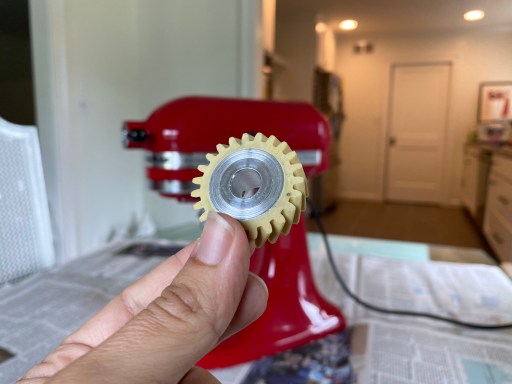
Stand mixers use gears to turn the beater. These can wear out, especially if you use the mixer for heavy doughs. Many brands use plastic gears to reduce noise, but these wear faster.
Symptoms Of Gear Failure
- Motor runs but beater doesn’t move
- Loud grinding or clicking noises
Gearbox Access And Repair
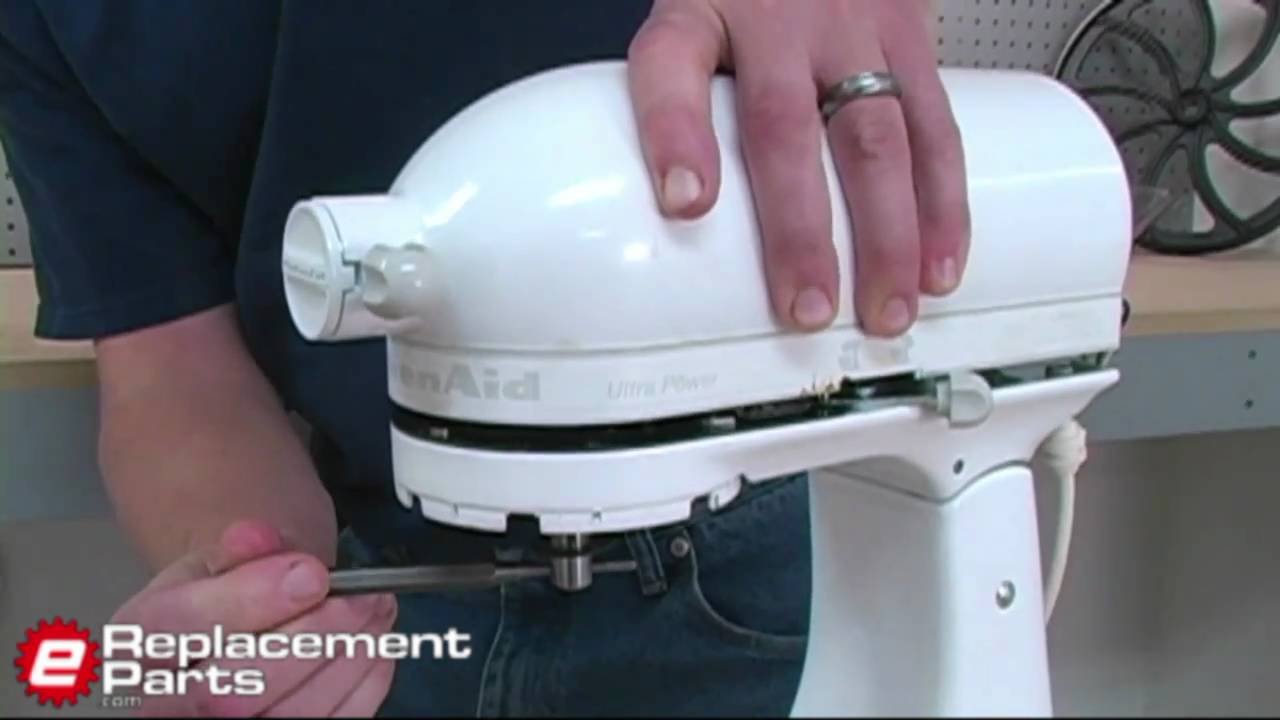
Most stand mixers have a gearbox under the head. Here’s how to check:
- Unplug the mixer.
- Remove the screws holding the top cover.
- Gently lift off the cover to reveal the gears.
- Check for broken, cracked, or missing teeth.
Solution: Replace worn gears. Many brands sell gear kits online. When replacing gears, clean out old grease and add fresh food-grade grease.
Comparing Gear Types
Here’s a look at common gear materials in stand mixers:
| Gear Material | Durability | Noise Level | Replacement Cost |
|---|---|---|---|
| Plastic | Low–Medium | Quiet | Low |
| Metal | High | Louder | Medium |
| Composite | Medium–High | Moderate | Medium |
If you use your mixer heavily, choosing a model with metal gears can avoid future failures.
Attachment And Hub Problems
Sometimes the mixer spins, but the attachment does not. This is often caused by a problem with the attachment hub or the beater shaft.
- Remove the attachment and inspect the shaft for wear or bending.
- Check the spring or pin that locks the beater in place. If it is missing, the beater won’t spin.
Solution: Replace the worn shaft or pin. Parts are often available from the manufacturer’s website.
Speed Control And Electronics
Modern mixers use electronic speed controls. These can fail, especially after power surges.
Signs Of Speed Control Problems
- Mixer turns on but only runs at one speed
- Mixer doesn’t start, but indicator lights work
Speed control boards usually sit behind the back panel.
Solution: Replacement boards can be purchased for many models. If you are comfortable, you can swap them yourself with a screwdriver and basic instructions.
Comparing Mechanical Vs. Electronic Speed Control
Let’s compare durability and repair cost:
| Type | Durability | Repair Difficulty | Replacement Cost |
|---|---|---|---|
| Mechanical | High | Low | Low |
| Electronic | Medium | Medium–High | Medium–High |
If you bake often, a mechanical speed control may last longer and be easier to fix.
Physical Jams And Cleaning
Food debris can sometimes jam the beater or the planetary gear inside the mixer head. Here’s what to do:
- Unplug the mixer.
- Remove all attachments and the bowl.
- Look for any dough, batter, or foreign objects in the hub or planetary gear.
- Clean all moving parts with a brush or cloth.
Tip: Regular cleaning prevents most jams.
When To Call A Professional
If you’ve tried the above steps and your stand mixer still isn’t spinning, it may be time for expert help. Some repairs—like motor rewinding or replacing complex electronic boards—are best done by professionals. You should also seek help if:
- Your mixer is under warranty
- You smell burning or see smoke
- You’re not comfortable opening the machine
Repairs done by certified technicians may also come with a service guarantee.
Preventing Future Stand Mixer Problems
A little care goes a long way to keep your mixer running well. Here are some simple practices:
- Don’t overload: Stick to the manufacturer’s bowl capacity.
- Let it rest: Pause for a few minutes after mixing heavy dough.
- Clean regularly: Wipe down after every use, and deep clean monthly.
- Check attachments: Make sure beaters and hooks are installed properly.
- Store safely: Keep in a dry, clean area.
Real-world Example: Kitchenaid Stand Mixer
One of the most popular stand mixer brands, KitchenAid, is known for its durability. However, even KitchenAid mixers sometimes stop spinning due to gear issues. For example, after years of use, many users report a loud clicking sound before the mixer stops turning. This is usually a sign of a worn worm gear—a part designed to break before the motor does. Replacing this gear is a common DIY repair.
Cost Of Fixing A Stand Mixer
Repair costs can vary depending on the part and brand. Here’s a general idea:
| Part | DIY Cost (USD) | Professional Repair (USD) |
|---|---|---|
| Power Cord | 10–25 | 40–75 |
| Gear Kit | 20–50 | 75–150 |
| Motor | 40–80 | 100–250 |
| Speed Control Board | 20–60 | 60–120 |
If your mixer is older or repair costs are high, it may be more economical to buy a new one.
Two Common Mistakes To Avoid
Many users make these mistakes when their stand mixer stops spinning:
- Forcing the machine: Never push or twist stuck parts. This can cause more damage.
- Using incorrect grease: Always use food-grade grease when servicing gears. Other types can contaminate food and harm plastic parts.
Avoiding these mistakes can save you time and money.
Practical Tips For Easy Stand Mixer Repairs
- Take photos at each step as you disassemble the mixer. This makes reassembly easier.
- Keep screws and small parts organized in a cup or tray.
- If you’re unsure, watch official repair videos for your mixer model.
- Wear gloves to protect your hands from sharp edges inside the mixer.
Credit: www.youtube.com
Where To Find Replacement Parts
Genuine parts are key for safety and performance. You can often find parts on:
- Manufacturer websites (e.g., KitchenAid, Cuisinart)
- Appliance parts retailers
- Local repair shops
When buying parts, match the model number exactly to avoid fit problems.
Frequently Asked Questions
Why Did My Stand Mixer Suddenly Stop Spinning?
Sudden stops are often caused by overheating, a broken gear, or a tripped overload switch. Let the mixer cool, reset if possible, and check for jams. If it doesn’t restart, investigate gears and the motor.
How Do I Know If The Motor Is Bad?
If your mixer is silent and doesn’t hum or vibrate, the motor could be faulty. Use a multimeter to check continuity, or have a technician test it. A burning smell can also indicate motor failure.
Is It Safe To Open My Stand Mixer For Repair?
Yes, for basic checks like cleaning or gear replacement, it’s generally safe if you unplug the unit first. For electrical repairs or if you’re unsure, consult a professional or use official guides like those at the iFixit Repair Community.
Can I Use Regular Grease On Mixer Gears?
No. Always use food-grade grease to avoid contaminating food and damaging plastic parts. Regular automotive or industrial grease is unsafe for kitchen appliances.
Should I Repair Or Replace My Stand Mixer?
If repair costs are less than half the price of a new mixer, repair makes sense. For older models or if several parts are broken, replacement may be more cost-effective.
A stand mixer is a long-lasting kitchen tool when cared for properly. With these troubleshooting tips, you can fix most spinning problems yourself and get back to baking in no time.

Credit: homeontheedge.com