Skip to content
Many people rely on a Dyson air purifier to keep their indoor air clean. These devices remove dust, pollen, pet dander, and harmful particles. Over time, the filter inside your Dyson air purifier fills up with these pollutants. When the filter is full, the purifier cannot clean the air properly. Resetting the filter is an important step after you change it. Some people forget this, which can cause the machine to show wrong information or stop working at its best.
Resetting the Dyson air purifier filter is easy if you follow the right steps. This article will show you how to do this for different Dyson models, explain why it matters, give troubleshooting tips, and answer common questions. You’ll find simple instructions, example scenarios, and practical advice to keep your air purifier running smoothly.
Why Resetting The Dyson Air Purifier Filter Is Important
Changing the filter is only half the job. After you replace the old filter, the filter indicator on your Dyson purifier must be reset. If you skip this, your machine may:
- Show a “filter full” warning even after you install a new filter.
- Not track the new filter’s usage time correctly.
- Reduce air flow or cleaning power, as the machine may think the filter is still dirty.
Resetting the filter tells your Dyson device it has a new filter, so it can monitor the filter life from zero. This helps you:
- Get the best air cleaning performance.
- Make your filter last as long as possible.
- Avoid unnecessary “replace filter” alerts.
How To Tell If Your Dyson Filter Needs Resetting
Most Dyson air purifiers have a filter life indicator. Here’s how you can spot if you need to reset:
- Filter light stays on: After a filter change, the “replace filter” light or message should go away. If it stays, you must reset.
- App notification continues: If you use the Dyson Link app, it may keep warning about the old filter.
- Reduced airflow: Sometimes, the purifier lowers the fan speed if it “thinks” the filter is full.
A quick reset fixes all these problems.
Step-by-step: Resetting The Filter On Popular Dyson Air Purifiers
Different Dyson models have slightly different reset steps. Below are guides for the most common types.
Dyson Pure Cool, Pure Hot+cool, And Pure Cool Link
These models are the most popular in homes and offices. Here’s how to reset the filter:
- Replace the old filter: Unplug the device, open the filter cover, and swap the old filter for a new one. Close everything securely.
- Plug in and turn on: Power the machine back on.
- Press and hold the ‘Standby ON/OFF’ button: On the remote or device, press and hold this button for about 6 seconds.
- Watch the display: The screen should show a countdown or flash. When it finishes, the filter life resets.
Tip: Some models have a physical button near the filter cover instead of on the remote.
Dyson Pure Humidify+cool
- Swap the filter: Open the filter area and fit the new filter in place.
- Reset using the LCD screen: On the machine, press the menu button to find the “filter life” option.
- Press and hold: When “reset filter” shows, press and hold the select button until you see confirmation.
Dyson Link App Method
If you use the app, you can reset the filter through your phone:
- Connect to your purifier: Open the app and select your device.
- Go to settings: Tap the menu, then find “filter management” or “filter life.”
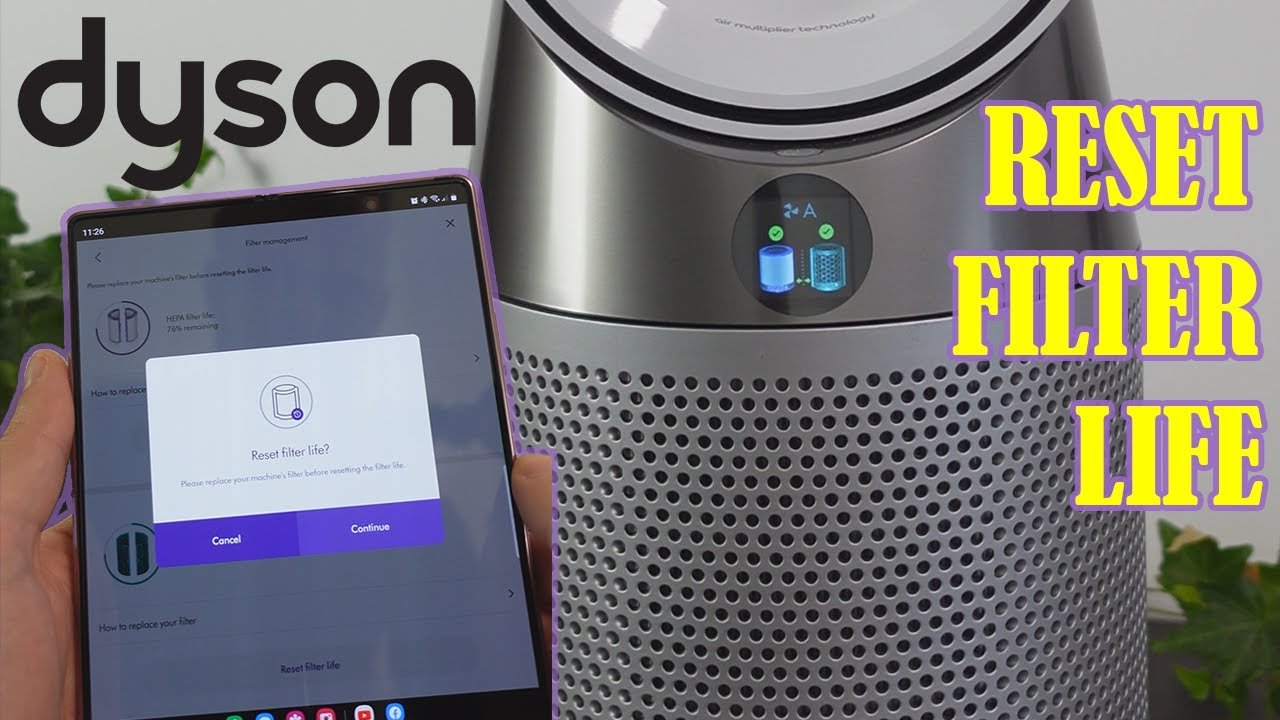
- Select reset: Tap “reset filter,” then follow the on-screen instructions.
Pro Insight: If you have Wi-Fi issues, reset the filter using the buttons on the device instead of the app.
Comparison Of Reset Methods By Model
Below is a quick overview of reset methods for various Dyson purifiers:
| Model Name | Reset Method | Special Steps |
|---|---|---|
| Pure Cool Link | Standby ON/OFF button | Hold for 6 seconds |
| Pure Hot+Cool | Remote or device button | Wait for countdown |
| Pure Humidify+Cool | LCD Screen menu | Hold select to confirm |
| Dyson Link App models | App reset | Follow app prompts |
Common Mistakes When Resetting Dyson Filters
Many users make small errors that cause problems. Watch out for these:
- Not holding the button long enough: You must hold the reset button (or app command) for the full 5–6 seconds.
- Forgetting to close the filter cover: The reset may not work if the filter door isn’t locked in place.
- Mixing up filter types: Dyson air purifiers use HEPA and carbon filters. Make sure you use the right one for your model before resetting.
- Using the wrong reset method: Some people try to reset using the app when their model only supports physical button resets.
Extra Tip: Always unplug the machine before changing the filter for safety. Plug it back in before starting the reset.
Credit: www.gabinetedelaorden.com
How Often Should You Replace And Reset The Filter?
The frequency depends on your environment and the Dyson model. Most Dyson air purifier filters last:
- 12 months in average homes.
- 6 months in homes with pets, smoke, or city air.
- Longer if you use the purifier less often or in a very clean area.
Your machine tracks filter life based on usage hours. When the indicator shows “replace filter,” it’s time to swap and reset.
Filter Life Estimates
Here’s a quick look at how long filters usually last:
| Model | Average Filter Life | Best For |
|---|---|---|
| Pure Cool | 12 months | Bedrooms, offices |
| Pure Hot+Cool | 12 months | All seasons |
| Pure Humidify+Cool | 12 months | Dry climates |
| Desk Purifiers | 6–9 months | Small spaces |
Hidden Detail: If you use your purifier 24/7 or live in a city with heavy air pollution, filters can wear out in 6–8 months.
How Resetting The Filter Boosts Air Quality
A filter reset is not just about clearing a warning light. It’s key to:
- Ensuring your purifier measures air quality accurately.
- Letting the device optimize its fan speed and cleaning power.
- Reminding you when the next filter change is due, based on real usage.
If you ignore the reset, air quality sensors may show wrong results, and the filter life countdown will be off. This can lead to unclean air, wasted energy, and higher costs over time.
Credit: www.youtube.com
What If The Filter Reset Doesn’t Work?
Sometimes, the reset process doesn’t work as expected. Here’s what you can do:
- Double-check the filter: Make sure the new filter is the correct one for your Dyson model and is installed properly.
- Try the reset again: Repeat the steps, holding the button or following the app process slowly.
- Restart the machine: Unplug for 1 minute, plug back in, and try again.
- Update the Dyson Link app: If using the app, check for updates. An outdated app can cause reset failures.
- Contact Dyson support: If nothing works, your purifier may need a firmware update or repair.
Secret Tip: Some Dyson models need two resets (one for HEPA, one for carbon) if they use both filters. Check your manual.
Comparing Dyson Filter Reset With Other Brands
Dyson makes reset simple, but how does it compare to other brands?
| Brand | Reset Method | Typical Issues |
|---|---|---|
| Dyson | Button/App | Rare, usually works first time |
| Honeywell | Button | Some models lack indicator |
| Levoit | Button | Must unplug to reset |
| Philips | Button/LCD | Complex menu navigation |
Dyson’s method is usually easier, but always check your model’s manual for the right steps.
Best Practices For Maintaining Your Dyson Air Purifier
To keep your purifier working well:
- Vacuum the outer cover every few weeks to remove dust.
- Use genuine Dyson filters. Imitation filters may not fit well and can damage your machine.
- Keep the purifier away from walls and objects to allow good airflow.
- Check the Dyson Link app (if available) for alerts, firmware updates, and maintenance reminders.
- Log your filter changes in a notebook or on your phone so you know when the last reset happened.
Non-Obvious Insight: Pet owners may need to clean the sensor area monthly. Pet hair can block air sensors, causing false filter alerts.
Cost Of Not Resetting Your Dyson Air Purifier Filter
If you skip the reset after changing the filter, you risk:
- Wasting filter life: The device may think the new filter is old and tell you to replace it too soon.
- Poor air quality: The machine may not increase fan speed or run enough to clean the air.
- Extra costs: Replacing filters more often than needed can get expensive. Dyson filters can cost $60–$100 each.
Fact: According to Dyson’s support site, forgetting to reset can reduce filter lifespan by up to 30%.
Credit: www.reddit.com
Where To Find Reliable Dyson Filter Reset Information
Always use trusted sources for your model’s instructions. The official Dyson Support page has guides, videos, and manuals for each device.
Avoid following random YouTube videos or forums unless they show your exact model. Using wrong steps can damage your purifier or void the warranty.
Frequently Asked Questions
How Do I Know If My Dyson Filter Reset Worked?
After you reset, the “replace filter” warning should disappear, and the filter life reading should show 100% or “new.” If you use the app, it will also show “filter life: full” or similar.
Can I Wash And Reuse Dyson Air Purifier Filters?
No. Dyson filters are not washable or reusable. Washing can damage the material and ruin the filter. Always use a new filter when changing.
What Happens If I Don’t Reset The Filter After Changing It?
The purifier will keep showing a “replace filter” message and may not work properly. It could also shorten the filter’s life and affect air cleaning.
Do All Dyson Purifiers Need A Manual Filter Reset?
Most models need a manual or app-based reset after changing the filter. Some newer models may reset automatically, but always check your user manual.
Where Can I Buy Genuine Dyson Filters?
You can buy genuine Dyson filters from the Dyson website, official stores, or trusted retailers. Avoid off-brand filters as they may not fit or work well.
Keeping your Dyson air purifier in top condition is easy if you replace and reset the filter on time. This simple habit protects your health, saves money, and keeps your air fresh every day.