Skip to content
If you notice your stand mixer shaking while mixing, you’re not alone. Many home bakers and cooks experience this issue at some point. A stand mixer is supposed to make mixing easy and hands-free, but when it starts to vibrate, rattle, or wobble on the counter, it can feel worrying. Is it normal? Is your mixer broken? Will your dough spill everywhere? These are common questions, especially for beginners.
In this article, you’ll discover the main reasons why your stand mixer shakes during use, how to fix or prevent it, and what signs mean it’s time for professional help. We’ll also look at practical examples, share helpful tips, and give you clear advice, so you can keep mixing confidently.
What Causes A Stand Mixer To Shake?
Understanding the real causes is the first step to solving the problem. Let’s break down the most common reasons why your stand mixer might be shaking or vibrating.
1. Uneven Or Heavy Mixing Loads
When you add a lot of ingredients or mix heavy doughs (like bread), the mixer can struggle. The motor works harder, and the bowl might move or vibrate more than usual. This is especially true for thick batters or doughs with high gluten content.
2. Incorrect Bowl Placement
If the mixing bowl isn’t locked in place properly, the mixer can’t stabilize itself. The bowl may bump against the body, creating extra movement. Always check the bowl’s position before starting.
3. Mixer Is Not Level
A stand mixer must sit on a flat, stable surface. If your countertop isn’t level or you place the mixer too close to the edge, it will wobble. Even small tilts can make a big difference.
4. Loose Attachments
Sometimes, the beater, whisk, or dough hook isn’t attached correctly. If they wobble, the force transfers to the mixer, causing shaking. Double-check that attachments click firmly into place.
5. Speed Setting Too High
Mixing at high speed with heavy ingredients can push the mixer beyond what it’s designed for. Most stand mixers recommend lower speeds for thick doughs and only use high speeds for lighter tasks.
6. Internal Mechanical Problems
Over time, parts inside the mixer can wear out. Loose gears, worn bearings, or a damaged motor mount may cause the mixer to shake. These issues usually need professional repair.
7. Weight And Design Factors
Not all stand mixers are equally stable. Heavier models tend to shake less. Cheaper or lighter mixers may vibrate more, especially under tough mixing conditions.
Here’s a quick comparison of stand mixer stability based on weight and motor power:
| Model Type | Weight (lbs) | Motor Power (Watts) | Stability Rating |
|---|---|---|---|
| KitchenAid Artisan | 26 | 325 | High |
| Hamilton Beach Classic | 12 | 275 | Medium |
| Budget Generic | 9 | 180 | Low |
Notice how heavier mixers with stronger motors are usually more stable.
Is It Normal For A Stand Mixer To Shake?
Some shaking is common. Especially when mixing stiff doughs, the mixer may move a bit. But if your mixer is bouncing, sliding, or making loud noises, it’s not normal. It could signal a problem or poor setup.
Manufacturers like KitchenAid mention that a slight vibration is expected, but not excessive movement. Most stand mixers are designed to handle some shaking, but they should not “walk” across the counter or spill ingredients.
How To Fix A Shaking Stand Mixer
Now, let’s look at practical steps you can take to reduce or stop the shaking. These solutions are simple and don’t require special tools.
1. Check Surface And Placement
- Place the mixer on a flat, sturdy surface.
- Avoid countertops with uneven edges.
- Keep the mixer away from the edge to prevent falls.
2. Secure The Mixing Bowl
- Make sure the bowl locks firmly into the base.
- Listen for the click or check the guide marks.
- If the bowl is loose, adjust it until it sits snugly.
3. Attachments Should Be Tight
- Insert the beater, whisk, or dough hook until it clicks.
- If the attachment wobbles, remove and reinsert.
- For mixers with a pin or screw, tighten it gently.
4. Use Correct Speed Settings
- For dense dough, start at low speed.
- Increase speed only if the mixer handles it well.
- Avoid using the highest speed for heavy loads.
5. Don’t Overload The Mixer
- Stick to the recommended ingredient amounts.
- If you need to mix a large batch, split it in half.
- Overloading strains the motor and can cause shaking.
6. Add Non-slip Pads
- Place a silicone mat or rubber pad under the mixer.
- This helps absorb vibrations and keeps the mixer from sliding.
7. Clean And Maintain Regularly
- Remove crumbs or dried dough from the mixer base.
- Clean the bowl and attachments after each use.
- Lubricate moving parts if the manual recommends it.
Here’s a quick comparison of common fixes and their effectiveness:
| Solution | Ease of Use | Effectiveness | Cost |
|---|---|---|---|
| Silicone Mat | Easy | High | $10-$20 |
| Checking Attachments | Very Easy | Medium | $0 |
| Splitting Batch | Easy | High | $0 |
| Professional Repair | Hard | High | $75-$200 |
When Should You Call For Professional Repair?
If you’ve tried the above fixes and your mixer still shakes badly, it may have a mechanical issue. Here are signs it’s time to call a technician:
- Loud grinding or knocking sounds
- Mixer shakes even with light tasks
- Burning smell or smoke
- Mixer overheats and shuts down
These problems often mean loose gears, worn bearings, or electrical faults. Continuing to use the mixer can make the problem worse.
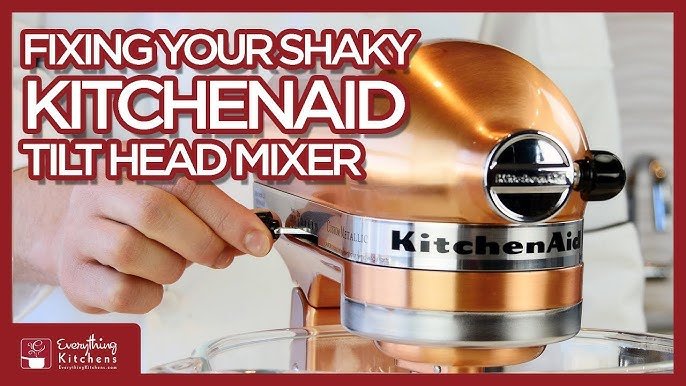
Credit: www.youtube.com
Stand Mixer Brands And Models: Stability Differences
Not all stand mixers are built the same. Some brands focus on stability and durability, while others cut corners to save cost. Here’s a comparison of three popular models and their shaking tendency:
| Brand & Model | Price | Shaking (Heavy Dough) | Durability |
|---|---|---|---|
| KitchenAid Pro Line | $499 | Minimal | Excellent |
| Cuisinart SM-50 | $249 | Moderate | Good |
| Generic Budget | $89 | High | Fair |
Higher-priced mixers usually have better stability due to heavier construction and stronger motors. Cheaper models tend to vibrate more, especially with difficult recipes.
Practical Examples And Tips For Everyday Use
Let’s look at real-life situations and how you can handle them.
- If you’re making bread dough and the mixer shakes, try splitting the dough into two batches.
- When mixing cake batter, use medium speed and make sure the bowl locks in place.
- For egg whites or lighter mixtures, higher speeds are safe, but still check attachments.
Non-obvious insight: Many beginners think the mixer’s shaking means it’s broken. In reality, simple changes like leveling the mixer or adjusting the batch size can solve most problems.
Another tip: If your mixer is older and shakes more than before, check for worn rubber feet underneath. Replacing them can make a big difference.
Common Mistakes That Cause Stand Mixer Shaking
Avoid these errors to keep your mixer stable:
- Mixing too much at once
- Ignoring the bowl lock
- Using the wrong speed
- Placing the mixer on a weak or unstable surface
- Forgetting to check attachments
- Not cleaning the mixer regularly
Many users overlook the importance of surface stability. Even a small wobble in the countertop can make the mixer shake a lot.
Should You Worry About Stand Mixer Shaking?
In most cases, shaking is not dangerous, but it’s important to pay attention. If the shaking is mild and only happens with heavy doughs, it’s probably normal. But if your mixer moves across the counter or makes strange noises, stop and check.
Pro tip: Never leave a shaking mixer unattended. It could fall and cause injury or damage.
If you’re unsure about your mixer’s behavior, consult the user manual or reach out to the brand’s support team. For more technical advice, you can check official resources like Consumer Reports.
Frequently Asked Questions
Why Does My Stand Mixer Shake More With Bread Dough Than Cake Batter?
Bread dough is much heavier and thicker than cake batter. The mixer’s motor has to work harder, and this creates more force and vibration. Cake batters are lighter and easier to mix, so there’s less movement.
Can Shaking Damage My Stand Mixer?
Yes, if shaking is severe or continues for a long time, it can cause mechanical wear. Loose gears, broken mounts, or electrical problems may happen. Always fix the shaking early to avoid damage.
Is It Safe To Use A Stand Mixer That Shakes?
If the shaking is mild and only happens with tough recipes, it’s safe. But if the mixer moves on the counter, makes loud noises, or gets hot, stop and check for problems.
How Can I Stop My Stand Mixer From Sliding?
Place a non-slip mat or silicone pad under the mixer. Make sure the surface is flat and keep the mixer away from the edge. Check the rubber feet and replace if worn.
Should I Repair Or Replace My Stand Mixer If It Keeps Shaking?
If your mixer is old and has mechanical issues, repair may be best. If repairs cost more than half the price of a new mixer, consider replacing it. Always check warranty options first.
Final Thoughts
A shaking stand mixer can feel alarming, but it’s usually easy to fix. Most problems come from simple mistakes like uneven surfaces, loose attachments, or overloading. By paying attention to setup, batch size, and speed, you can stop most shaking and keep your mixer running smoothly.
Remember, heavy-duty mixers are built to handle tough jobs with less vibration. But for all mixers, regular care and smart use make a big difference.
If your mixer keeps shaking after trying these tips, don’t ignore the problem. Check for mechanical issues and call for repair if needed. With the right approach, your stand mixer will stay stable and help you create delicious recipes for years to come.

Credit: www.reddit.com