Skip to content
A KitchenAid stand mixer is more than just a kitchen appliance. It’s a reliable partner for baking, cooking, and even making pasta or ice cream. But sometimes, you notice the beater scraping the bowl, or maybe it’s not touching ingredients at all.
These signs mean your stand mixer needs an adjustment. Learning how to adjust your KitchenAid stand mixer can make your mixing smoother, prevent damage, and save you money on repairs. Whether you’re a passionate baker or a casual home cook, understanding this process is essential.
Why Adjusting Your Kitchenaid Stand Mixer Matters
Many people don’t realize how important proper adjustment is. If your mixer’s beater is too high, it won’t mix well. If it’s too low, it may scratch the bowl and create metal shavings. Adjusting ensures you get the best results and protects your mixer. According to KitchenAid’s own user manuals, regular adjustment can extend the life of your appliance by several years.
Non-obvious insight: Even new mixers sometimes need adjustment. Manufacturing differences mean not every unit leaves the factory perfectly set.
Signs Your Mixer Needs Adjustment
Some signs are obvious, but others are easy to miss.
- The beater scrapes the bottom of the bowl.
- The beater doesn’t reach ingredients at the bottom.
- Ingredients are left unmixed after use.
- The mixer makes unusual noises during mixing.
- You see metal shavings in the bowl.
Ignoring these signals can lead to permanent damage. Some users think this is normal and keep using the mixer, but over time, the issue gets worse.
Tools And Materials You Need
Before starting, gather these:
- Flathead screwdriver (medium size)
- Small towel or cloth
- KitchenAid bowl and beater (for testing)
- A dime (for the “dime test”)
- Optional: Gloves, for better grip
You don’t need special tools. A basic screwdriver is enough for most models.
Understanding Mixer Adjustment Mechanism
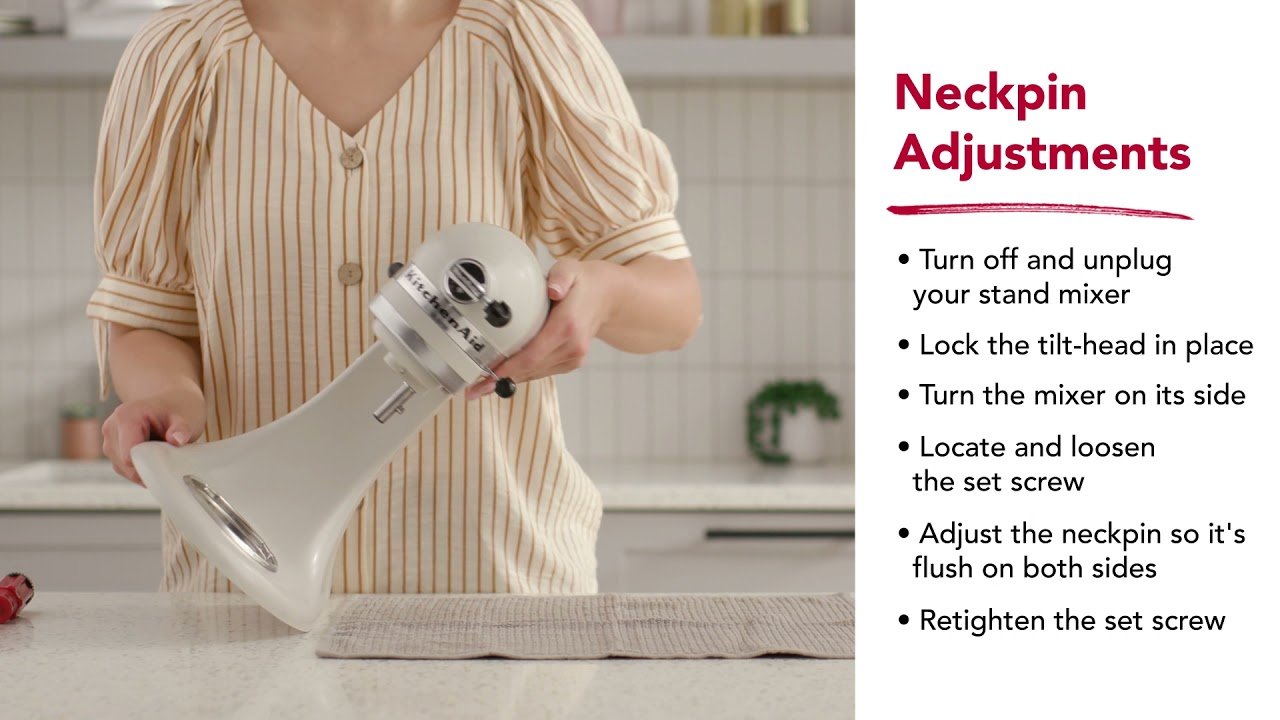
KitchenAid stand mixers use a height adjustment screw. This screw changes the position of the beater inside the bowl. Most KitchenAid tilt-head models have the screw located inside the neck where the head pivots. For bowl-lift models, the adjustment mechanism is near the bowl arms.
Here’s a comparison of where you’ll find the adjustment mechanism for each mixer type:
| Model Type | Adjustment Screw Location | Ease of Access |
|---|---|---|
| Tilt-Head | Neck hinge area | Easy |
| Bowl-Lift | Near bowl arms | Moderate |
Most users assume all mixers have the same adjustment screw location, but the difference matters. Always check your mixer’s manual for specifics.
Credit: www.kitchenaid.com
Step-by-step Guide To Adjusting Kitchenaid Stand Mixer
1. Safety First
Unplug the mixer before making adjustments. This prevents accidents and protects the motor.
2. Remove The Bowl And Beater
Take off the bowl and the beater. This gives you clear access to the adjustment screw.
3. Locate The Adjustment Screw
For tilt-head mixers, tilt the head back. Look for a small screw in the hinge area. For bowl-lift mixers, find the screw near the bowl arms.
4. The Dime Test
Place a dime in the bottom of the empty bowl. Attach the beater and lower it into place. Turn the mixer to “stir” speed (the lowest). Watch the dime:
- If the dime moves around the bowl about ½ inch every rotation, the height is correct.
- If the dime doesn’t move, the beater is too high.
- If the dime doesn’t move or the beater pushes it harshly, it’s too low.
This test is more accurate than guessing or relying on visual inspection.
5. Adjust The Screw
Turn the screw:
- Clockwise: Lowers the beater closer to the bowl.
- Counterclockwise: Raises the beater away from the bowl.
Make small adjustments—¼ turn at a time. Repeat the dime test after each adjustment.
6. Re-test And Fine-tune
It’s rare to get it perfect on the first try. Test, adjust, and repeat until the dime moves gently but doesn’t get stuck or scratched.
7. Final Assembly
Once adjusted, remove the dime, reattach the bowl and beater, and run the mixer with actual ingredients to verify performance.
Practical tip: Adjusting with the bowl empty is easier, but always do a final test with real dough or batter.
Common Mistakes And How To Avoid Them
Even experienced users make mistakes when adjusting their KitchenAid stand mixer.
- Over-tightening: Turning the screw too much can damage the hinge or bowl.
- Skipping the dime test: Visual checks are unreliable; always use the dime.
- Not unplugging: Adjusting while plugged in is risky.
- Using the wrong screwdriver: A screwdriver that’s too large can strip the screw.
- Forgetting to test with ingredients: Adjusting for an empty bowl is not enough.
Avoid these mistakes to keep your mixer in good condition.
Bowl-lift Vs Tilt-head: Adjustment Differences
Many people wonder if the adjustment process is the same for all KitchenAid mixers. Here’s a quick comparison:
| Feature | Tilt-Head | Bowl-Lift |
|---|---|---|
| Adjustment Screw Location | Neck hinge | Near bowl arms |
| Adjustment Difficulty | Easy | Moderate |
| Dime Test Usable? | Yes | Yes |
| Typical Use | Home kitchens | Heavy duty, bakeries |
Non-obvious insight: Some bowl-lift models require removing the side panels to access the adjustment screw. If you don’t see the screw easily, refer to your manual or contact KitchenAid support.
How Often Should You Adjust Your Mixer?
Adjustment isn’t a one-time task. Over time, mixers can lose their settings due to vibration, heavy loads, or frequent use.
Recommendations:
- Check adjustment every 6–12 months.
- Always check after moving the mixer or after intense use (like kneading heavy dough).
Professional bakers adjust their mixers monthly. For most home users, twice a year is enough.
Credit: www.youtube.com
Troubleshooting After Adjustment
If your mixer still doesn’t perform well after adjustment, try these solutions:
- Check for bent beaters: A bent beater can cause uneven mixing.
- Inspect the bowl: Dents or warping affect the adjustment.
- Listen for unusual sounds: Grinding or scraping means further adjustment is needed.
- Test with different speeds: Sometimes issues appear only on higher speeds.
If problems persist, the mixer may need professional servicing.
Maintaining Mixer Performance
Adjustment is just one part of keeping your KitchenAid stand mixer healthy. Here are extra steps for long-term care:
- Clean the adjustment area regularly.
- Don’t overload the mixer beyond its stated capacity.
- Use only genuine KitchenAid parts for replacements.
- Store the mixer on a stable surface to prevent settings from shifting.
Many users don’t realize that frequent cleaning can prevent adjustment issues. Grease and food debris can affect the screw mechanism.
Real-life Example: Adjustment Success Story
Sarah, a home baker in Ohio, noticed her cookies were inconsistent. After doing the dime test, she found her beater was too high. By adjusting the screw just ¼ turn, her mixer started blending perfectly. She reported saving hours in mixing time and saw a clear improvement in her baked goods.
This example shows that small adjustments can make a big difference, even for experienced bakers.
Kitchenaid Mixer Adjustment Vs Professional Servicing
Here’s a quick comparison between adjusting your mixer yourself and getting professional servicing:
| Aspect | DIY Adjustment | Professional Servicing |
|---|---|---|
| Cost | $0–$10 (tools) | $50–$150 |
| Time Required | 10–30 minutes | 1–3 days |
| Skill Needed | Basic | None (for user) |
| Effectiveness | High for basic issues | High for complex issues |
For most users, DIY adjustment is safe and effective. Only rare or complex issues need professional help.
Where To Find Reliable Instructions And Support
KitchenAid’s official website offers videos and manuals for adjustment. If your model is unusual or you’re stuck, visit KitchenAid Official Site for more support.
Frequently Asked Questions
How Do I Know If My Mixer Needs Adjustment?
If your mixer leaves unmixed ingredients at the bottom, makes scraping noises, or shows metal shavings, it needs adjustment. The dime test is the easiest way to check.
Can I Adjust My Mixer Without The Dime Test?
Yes, but the dime test is the most accurate. Visual inspection can miss small issues. Using the dime test saves time and prevents mistakes.
Is It Safe To Adjust The Screw Myself?
Yes, as long as you unplug the mixer first and use the correct tool. Make small adjustments and never force the screw. Most users can do this safely.
How Often Should I Adjust My Kitchenaid Mixer?
Check your mixer every 6–12 months, or after heavy use. If you notice mixing problems, adjust immediately. Regular checks prevent bigger issues.
What If Adjusting Doesn’t Fix My Mixer?
If problems continue, check for bent beaters, warped bowls, or unusual sounds. If you can’t solve the issue, contact KitchenAid support or a professional repair service.
Adjusting your KitchenAid stand mixer is simple but powerful. It can make your baking easier, protect your appliance, and save you money. With a little time and the right steps, you’ll enjoy perfect mixing every time.
Credit: www.youtube.com