Skip to content
Your countertop ice maker is a handy kitchen tool. It saves time, delivers fresh ice, and makes entertaining easier. But like any appliance, it needs care to keep working well. Many owners notice their ice maker slowing down or breaking after just a year or two. This guide will show you how to extend the lifespan of a countertop ice maker. With the right habits, simple maintenance, and smart use, you can keep your ice maker running smoothly for years.
Why Countertop Ice Makers Fail Early
Most ice makers are built to last about 2–5 years, but some stop working sooner. Here are the main reasons:
- Mineral buildup from hard water clogs the system.
- Dirty sensors make the machine misread water levels.
- Poor cleaning habits lead to mold and odors.
- Overloading stresses the motor and parts.
- Ignoring warning signs (like strange noises) causes bigger problems.
Understanding these issues helps you prevent them. For example, using filtered water and cleaning regularly can reduce mineral buildup and extend your ice maker’s life.
Daily Habits That Protect Your Ice Maker
Small actions every day can make a big difference. Here are some easy routines:
- Empty the ice basket when full. Leaving ice inside can cause the machine to overwork and freeze up.
- Wipe the exterior with a damp cloth to remove dust and spills.
- Check the water reservoir for debris or cloudiness before refilling.
- Use filtered water instead of tap water. This reduces minerals and prevents scale.
These habits take less than five minutes but help your machine last longer. Many people skip them, thinking they’re not important, but small care adds up.
Credit: www.walmart.com
Deep Cleaning: How And When
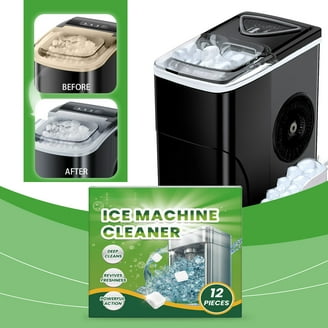
Regular deep cleaning is the best way to keep your ice maker running efficiently. Most brands recommend cleaning every 1–2 months, or more often if your water is hard. Here’s how to do it:
Step-by-step Deep Cleaning
- Unplug the ice maker.
- Remove the ice basket and water reservoir.
- Wash parts with warm, soapy water. Rinse and dry thoroughly.
- Clean the inside of the machine with a soft cloth. Avoid abrasive cleaners.
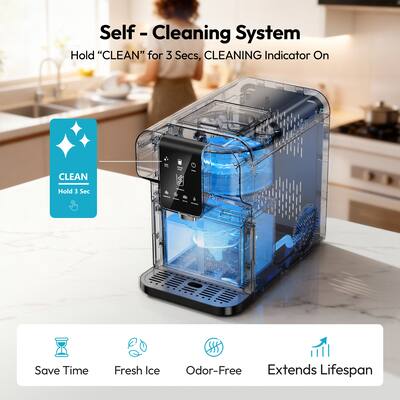
- Run a cleaning cycle (if your model has one) using a mixture of water and vinegar (1: 1 ratio).
- Rinse again by running a cycle with plain water.
Why Deep Cleaning Matters
Cleaning removes mineral scale, mold, and bacteria. Machines that aren’t cleaned can become smelly and slow. Deep cleaning also protects sensors and keeps ice tasting fresh.
Common Mistakes In Cleaning
- Using harsh chemicals (which damage plastic and sensors)
- Skipping cleaning cycles
- Not drying parts before reassembly
Water Quality: Hidden Factor In Lifespan
Water quality affects your ice maker more than you might think. Hard water (high in minerals) causes scale buildup inside the machine, leading to blockages and poor ice production. Here’s how water types compare:
| Water Type | Mineral Content | Effect on Ice Maker |
|---|---|---|
| Tap Water (Hard) | High | Quick scale buildup |
| Tap Water (Soft) | Low | Less scale, better for machine |
| Filtered Water | Very Low | Best for machine’s lifespan |
| Bottled Water | Medium | Safe, but not cost-effective |
If your home has hard water, consider using a water filter or distilled water for your ice maker. This small change can prevent most common breakdowns.
Credit: www.bestbuy.com
Storage And Placement: Where You Put Your Ice Maker Matters
Many owners don’t think about where their ice maker sits, but placement affects performance and lifespan.
- Avoid direct sunlight. Heat makes the machine work harder, stressing the compressor.
- Leave space around the unit (at least 4 inches on all sides) for airflow.
- Keep away from ovens and stoves. High temperatures shorten lifespan.
- Level surface only. Tilted placement can cause leaks and sensor errors.
These details are easy to overlook but prevent overheating and mechanical failures.
Usage Patterns: Smart Operation For Longevity
How you use your ice maker matters. Here are some tips:
- Don’t run it non-stop. Give the machine breaks, especially after making a batch.
- Don’t overload the water reservoir. Overfilling causes leaks and sensor problems.
- Avoid freezing the unit. If storing in winter, drain and dry completely.
Batch Making Vs Continuous Use
Some people like to keep their ice maker running 24/7. This wears out the motor and parts faster. Instead, make ice in batches and store extra in your freezer. Here’s a quick comparison:
| Usage Pattern | Effect on Lifespan | Ice Quality |
|---|---|---|
| Continuous | Shorter | Consistent |
| Batch | Longer | Fresh, but may vary |
Batch making is better for the appliance, especially if you don’t need ice all day.
Credit: www.katom.com
Preventive Maintenance: What To Check And When
Preventive maintenance means stopping problems before they start. Here’s what to look for:
- Strange noises (like grinding or buzzing)
- Slow ice production
- Leaks or puddles under the unit
- Error lights or sensor warnings
If you see any of these, check the manual or contact support. Fixing small issues early prevents bigger breakdowns.
Diy Maintenance Tasks
- Tighten loose screws every few months
- Check power cord for wear or damage
- Clean air vents with a soft brush
Some tasks are simple, but others (like replacing sensors) may need a professional.
Comparing Ice Maker Brands: Lifespan And Reliability
Not all countertop ice makers are equal. Some brands are known for lasting longer. Here’s a brief comparison:
| Brand | Average Lifespan | Warranty Period | Common Issues |
|---|---|---|---|
| GE Profile | 4–5 years | 1 year | Sensor errors |
| Igloo | 2–3 years | 1 year | Motor noise |
| Frigidaire | 3–4 years | 1 year | Water leaks |
| NewAir | 3–4 years | 1 year | Slow ice |
Choosing a reliable brand and registering your warranty helps if you run into problems. Some brands also offer extended warranties for peace of mind.
Two Non-obvious Insights Most Owners Miss
- Sensor cleaning is crucial. Many owners clean only the basket and reservoir, but forget the sensors. Dirty sensors cause false error codes and poor ice production. Use a cotton swab with vinegar to gently clean sensors every month.
- Letting the machine rest after cleaning helps electronics dry out and prevents mold. Don’t rush to restart—wait at least 30 minutes.
Saving Money: When To Repair Vs Replace
If your ice maker breaks, should you fix it or buy a new one? Here’s a simple rule: If repairs cost over 50% of a new unit, replacement is usually smarter. Most repairs (like sensor replacement or compressor fixing) cost $100–$200, while new machines start around $120. For more information on repair costs and tips, visit Consumer Reports.
Quick Tips For Long-term Performance
- Always unplug before cleaning
- Don’t use ice maker in freezing temperatures
- Store in a dry place when not in use
- Clean vents and sensors monthly
- Use filtered water for every batch
These small actions protect your investment and ensure fresh, safe ice.
Frequently Asked Questions
How Often Should I Clean My Countertop Ice Maker?
Clean your ice maker every 1–2 months. If your water is hard, clean every month to prevent mineral buildup.
What Water Type Is Best For Ice Makers?
Filtered water is best. It reduces minerals and prevents scale. Tap water is okay if it’s soft, but hard tap water causes problems.
Can I Leave My Ice Maker Running All Day?
You can, but it’s better to make ice in batches. Continuous use wears out the motor and parts faster.
Why Does My Ice Maker Smell Bad?
Bad smells usually mean mold or bacteria. Clean all parts thoroughly with vinegar and water. Don’t forget sensors and vents.
Is It Worth Repairing An Old Ice Maker?
If repairs cost less than half the price of a new machine, it may be worth it. Otherwise, buying a new unit is often smarter.
Taking care of your countertop ice maker doesn’t have to be complicated. With regular cleaning, smart placement, good water, and careful operation, you’ll enjoy fresh ice for years. The steps in this guide are simple but powerful. Start today and protect your appliance—and your wallet—for the long run.