Resetting a microwave oven might sound simple, but the process can be confusing if you’ve never done it before. Whether your microwave is not responding, showing an error code, or acting strangely, a reset can often solve the problem quickly.
This guide walks you through each step, giving you clear instructions and practical advice. You’ll also find helpful comparisons, useful tips, and answers to common questions about microwave resets.
Why Reset A Microwave Oven?
Most people reset their microwave when something goes wrong. This can include a frozen display, error messages, or buttons not working. In many cases, a reset can bring the appliance back to normal without needing a technician. Resetting is also useful if you want to clear old settings or restore factory defaults before selling or gifting your microwave.
Common Reasons To Reset Your Microwave
Several issues might make you consider a reset:
- Error codes: The display shows numbers or letters you don’t understand.
- Unresponsive controls: Buttons or touchpads stop working.
- Strange noises or beeps: The microwave makes unexpected sounds.
- Power surges: After a blackout or electrical storm.
- Frozen display: The screen won’t change or update.
Knowing the reason helps you decide if a reset is the right fix or if you need expert help.

Credit: www.youtube.com
Basic Types Of Microwave Resets
Microwaves generally allow three main reset methods. Each serves a different purpose.
| Reset Type | When to Use | Difficulty |
|---|---|---|
| Soft Reset | For small glitches or to clear the current program | Very Easy |
| Power Reset (Hard Reset) | For more serious errors or if the microwave is unresponsive | Easy |
| Factory Reset | To restore original settings or clear all data | Moderate |
Step-by-step: How To Reset A Microwave Oven
Let’s walk through each reset method so you can pick the right one for your situation.
Soft Reset
A soft reset is the fastest and easiest. It’s useful if you’ve entered a wrong setting or want to stop the current cycle.
- Press the Stop/Cancel button once.
- Wait a moment. The microwave should beep or return to the main clock or standby mode.
- If the display is clear, you’re done.
Tip: If your microwave has a “Clear” button, use that instead. Older models may not have these options.
Power (hard) Reset
A power reset cuts off all electricity, which can clear deeper errors or unresponsive controls.
- Unplug the microwave from the wall outlet.
- Wait at least 1-2 minutes. This gives the internal memory time to clear.
- Plug the microwave back in.
- The clock may flash. Reset the time if needed.
This method is safe for all home microwaves. If your microwave is built-in or over-the-range, you may need to turn off the kitchen circuit breaker instead of unplugging.
Non-obvious insight: Sometimes, waiting a full 5 minutes after unplugging helps with stubborn errors. Most users don’t wait long enough for a true reset.
Factory Reset
A factory reset restores all settings to how they were when the microwave was new. This deletes presets, cooking memories, and sometimes the clock.
Not all microwaves have this option. Check your manual for your model’s steps. Here’s a common method:
- Open the microwave door.
- Press and hold both the Stop/Cancel and Start buttons together for about 10 seconds.
- The display might blink or show “RESET” or “00: 00.”
- Set the clock and other preferences again.
Warning: You’ll lose all saved settings and custom presets.
If your microwave doesn’t reset this way, search for the exact steps for your brand on the manufacturer’s support page.
Credit: removeandreplace.com
Reset Steps By Popular Microwave Brands
Different brands sometimes use unique reset steps. Here’s how some popular brands handle it:
| Brand | Soft Reset | Power Reset | Factory Reset |
|---|---|---|---|
| Panasonic | Stop/Reset button | Unplug for 2 minutes | Hold Stop/Reset for 3-5 sec |
| Samsung | Stop/Clear button | Unplug for 2 minutes | Service menu; consult manual |
| LG | Stop/Clear button | Unplug for 2 minutes | Usually no user factory reset |
| Sharp | Stop/Clear button | Unplug for 1 minute | Press Stop/Clear 3x in 10 sec |
Advice: Always check your microwave’s user manual for exact steps. Not all models support factory resets, and some use unique button combinations.
When A Reset Won’t Fix The Problem
Sometimes, a reset is not enough. Here are signs you might need professional repair or a replacement:
- The microwave won’t power on even after resetting.
- The turntable won’t spin or makes grinding noises.
- There is a burning smell or smoke.
- The fuse blows every time you plug it in.
- The microwave runs but does not heat food.
These are usually signs of hardware failure, not just a software glitch.
Safety Tips Before Resetting
Safety is key. Microwaves use high voltage, even when unplugged, so take care.
- Always unplug before touching any part inside.
- Never open the microwave’s back or sides.
- If you see sparks, smoke, or a burning smell, unplug and call a technician.
- Don’t spray water or cleaning chemicals inside the microwave’s vents or control panel.
Non-obvious insight: Even unplugged, a microwave’s capacitor can hold a dangerous charge. Never try to repair internal parts yourself.
Resetting Vs. Repairing: Cost Comparison
How much does a reset save you compared to calling for repairs? Here’s a quick look.
| Solution | Time Needed | Cost (USD) |
|---|---|---|
| Soft/Power Reset | 2-5 minutes | Free |
| Factory Reset | 5-10 minutes | Free |
| Professional Repair | 2-7 days | $80–$200 |
| Replacement | 1-2 hours (setup) | $60–$500+ |
As you can see, resetting is always worth a try before spending money.
Common Mistakes When Resetting A Microwave
Many people make simple errors when trying to reset a microwave. Here’s what to avoid:
- Not unplugging long enough: One or two seconds is not enough for a full reset.
- Forgetting to check the circuit breaker: If the microwave is built-in, the outlet may be controlled by a wall switch or breaker.
- Skipping the user manual: Each microwave is a bit different—always check the instructions for your model.
- Pressing random buttons: This might trigger a child lock or another function, making things worse.
- Trying to fix internal parts: Only professionals should open the microwave’s case.
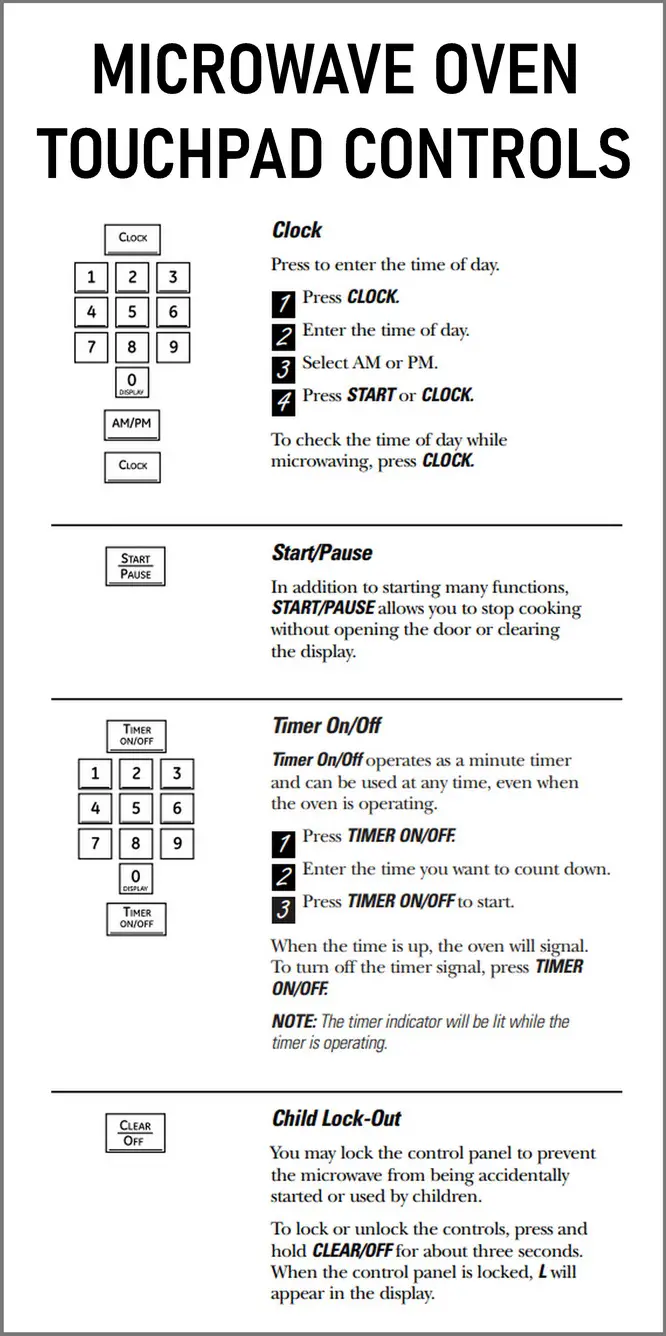
Child Lock Vs. Reset: Understanding The Difference
Sometimes, a microwave seems broken but is simply in child lock mode. This safety feature stops children from starting the microwave by accident. It can look like the microwave is unresponsive.
How to recognize child lock:
- The display shows a key symbol or “LOC.”
- Buttons don’t respond, but the clock still works.
How to turn off child lock:
- Usually, press and hold the Stop/Cancel or 0 button for 3-5 seconds.
Check your manual for the right button for your model.
How To Set The Clock After Resetting
After a reset, the clock often flashes or returns to “00:00.” Setting the clock is simple on most models:
- Press Clock or Time.
- Use the number pad to enter the time.
- Press Start or Clock again to confirm.
If your model uses 12-hour or 24-hour format, follow the prompts to choose.
When To Call A Technician
If you’ve tried all reset steps and your microwave still isn’t working, it may be time to call for professional help. Here are some situations where it’s best to stop and get an expert:
- You see arcing (sparks) inside the oven.
- The microwave trips the breaker every time.
- The display stays blank or flashes even after resetting.
- The door won’t close or seal properly.
Microwaves are powerful appliances—never risk safety to save time or money.

Credit: www.lowes.com
Extra Tips For A Smooth Reset
- Write down your favorite presets before a factory reset so you can add them back later.
- If your microwave has Wi-Fi or smart features, you may need to reconnect it after a reset.
- Take photos of the control panel settings before resetting, especially for multi-step cooking programs.
Frequently Asked Questions
How Do I Know If My Microwave Needs A Reset Or A Repair?
If the microwave shows an error code, is frozen, or the controls don’t respond, try a reset first. If it still doesn’t work, especially if there’s no power or it won’t heat food, it’s time for a repair.
Does Unplugging A Microwave Reset It?
Yes, unplugging a microwave for 1-2 minutes usually performs a power reset. This clears most minor errors. For deeper issues or to restore factory settings, you might need to follow special button sequences.
Will Resetting Delete My Saved Presets And Clock?
A factory reset will erase all custom presets and the clock. A soft or power reset usually only clears the current program or error, not your saved settings.
Is It Safe To Reset A Microwave Myself?
Yes, as long as you follow basic safety rules: unplug before touching, never open the case, and avoid water near controls. If you’re unsure, check the user manual or ask a professional.
Where Can I Find The Exact Reset Steps For My Microwave Model?
Your microwave’s user manual is the best place to look. You can usually find manuals online on the manufacturer’s website or search for your model number. For more tips, visit the official Consumer Reports guide.
Resetting your microwave can fix many common problems in just a few minutes. It’s a simple way to avoid costly repairs and keep your kitchen running smoothly. With the right steps, you’ll have your microwave back in action in no time.