Skip to content
A meat thermometer is a small tool, but it can make a big difference in your kitchen. It helps you cook meat safely, avoid undercooked or dry food, and gives you confidence in your results. But what happens when your meat thermometer stops working? Suddenly, you can’t trust the numbers, and you may worry about food safety or ruining a meal. If you’re asking, “Why is my meat thermometer not working?” you’re not alone. Many people face this issue, and there are several reasons behind it.
In this article, you’ll learn the most common causes for meat thermometer problems, how to fix them, and what signs to watch out for. We’ll cover digital and analog thermometers, share practical troubleshooting steps, and highlight mistakes people often make.
By the end, you’ll know how to diagnose and solve thermometer issues, so you can cook with confidence again.
Common Reasons Your Meat Thermometer Isn’t Working
There are many possible causes for a meat thermometer malfunction. Some are simple, like a dead battery, while others may require more effort to fix. Let’s look at the main reasons:
1. Dead Or Weak Battery
Digital thermometers rely on batteries. If the battery is low or dead, the display may be blank, flicker, or give strange readings. Most digital models need a fresh battery every few months.
2. Sensor Damage
Both digital and analog thermometers have sensors inside the tip. If the sensor gets damaged by drops, bending, or extreme heat, it may show inaccurate temperatures.
3. Calibration Issues
Meat thermometers often need calibration. Over time, they can drift and show the wrong temperature. If you notice readings that seem off, calibration may be the problem.
4. Water Ingress
Moisture can seep into the thermometer, especially after washing or exposure to steam. Water inside the electronics or dial can cause malfunction or rust.
5. Manufacturing Defects
Some thermometers are faulty from the start. Cheap models or poor quality control may lead to failures soon after purchase.
6. Display Problems
For digital models, a broken display means you can’t read the temperature. Sometimes, the numbers are dim, missing segments, or frozen.
7. Battery Terminal Corrosion
If the battery terminals are corroded, power won’t flow properly. Look for white or greenish residue inside the battery compartment.
8. Loose Wiring
Inside digital models, wires can loosen or break from impact or repeated use. This causes intermittent or no readings.
9. Extreme Temperatures
Using a thermometer outside its rated range may damage components. For example, putting it in a hot oven or grill if it’s not designed for high heat.
10. Improper Storage
Storing your thermometer in humid areas, letting it sit in the sink, or leaving it inside a hot oven can shorten its lifespan.
How To Troubleshoot A Broken Meat Thermometer
Before you throw away your thermometer, try these steps. Many issues are easy to fix if you know what to look for.
Check The Battery
For digital thermometers:
- Remove the battery.
- Check for corrosion or moisture.
- Insert a new battery (usually a button cell).
- If the display turns on and gives normal readings, the battery was the problem.
Inspect The Sensor
- Look at the probe tip. Is it bent, broken, or discolored?
- If damaged, the thermometer may not be repairable.
Test Calibration
- Fill a glass with ice water. Insert the thermometer probe.
- It should read 32°F (0°C) after a minute.
- If it’s off by more than 2°F, recalibrate (see your manual).
Dry Out Moisture
- If you suspect water inside, leave the thermometer in a dry, warm place for 24 hours.
- Do not use a microwave or oven to dry it.
Check The Display
- If the numbers are faint or missing, try replacing the battery.
- Still broken? The display may be damaged and needs professional repair or replacement.
Examine Battery Terminals
- Look for corrosion.
- Clean terminals gently with a cotton swab and vinegar.
- Dry well before inserting a new battery.
Reset The Thermometer
- Some digital models have a reset button or require battery removal for 10 seconds.
- Follow the instructions in the manual.
Look For Warranty
- If your thermometer is new and defective, contact the manufacturer. Many offer warranties.
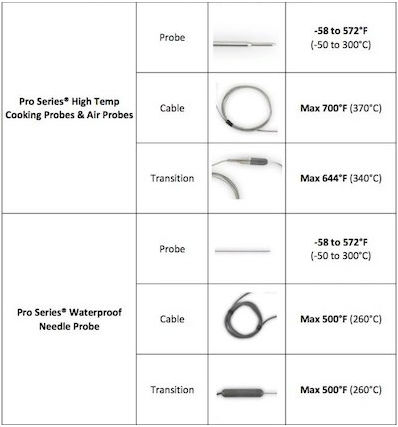
Credit: help.thermoworks.com
Comparison: Digital Vs Analog Meat Thermometers
Choosing the right thermometer can affect reliability. Here’s a quick comparison:
| Feature | Digital Thermometer | Analog Thermometer |
|---|---|---|
| Accuracy | Usually ±1°F | ±2–4°F |
| Speed | 2–5 seconds | 20–30 seconds |
| Battery | Yes (replacable) | No |
| Common Issues | Battery, display, sensor | Calibration, sensor damage |
| Calibration Needed | Occasionally | Regularly |
Digital models offer speed and precision but depend on batteries and electronics. Analog models are simpler but can drift over time and are slower.
Signs Your Meat Thermometer Needs Replacement
Sometimes, repairs aren’t enough. Here are signs you need a new one:
- Consistent wrong readings even after calibration
- Probe is cracked, bent, or rusted
- Display is dead or unreadable
- Thermometer won’t turn on with new batteries
- Water damage inside the casing
Calibration Methods For Meat Thermometers
If your thermometer isn’t accurate, calibration can help. Here are two methods:
Ice Water Method
- Fill a glass with ice and water.
- Insert the thermometer probe.
- Wait 1–2 minutes.
- It should read 32°F (0°C).
- If not, adjust (follow your manual).
Boiling Water Method
- Boil water.
- Insert the thermometer tip (avoid touching the pot).
- It should read 212°F (100°C) at sea level.
- Adjust as needed.
Tip: Altitude affects boiling point. At higher elevations, water boils lower than 212°F.
Preventing Meat Thermometer Problems
You can avoid most issues by caring for your thermometer. Here are practical tips:
- Don’t submerge digital thermometers in water.
- Store in a dry place.
- Replace batteries every 6–12 months.
- Calibrate every few months.
- Avoid dropping or bending the probe.
- Clean gently after use.

Credit: www.reddit.com
Meat Thermometer Brands: Reliability Comparison
Some brands offer better reliability. Here’s a quick look at popular options:
| Brand | Average Lifespan | Warranty | User Ratings |
|---|---|---|---|
| ThermoWorks | 4–6 years | 2 years | 4.7/5 |
| Taylor | 3–5 years | 1 year | 4.3/5 |
| CDN | 3–5 years | 5 years | 4.5/5 |
| Cheap Generic | 1–2 years | None/limited | 3.5/5 |
Buying from a reputable brand can reduce problems and provide better support.
Uncommon Insights Most Beginners Miss
- Altitude changes boiling point: If you live in a high area, calibrate using ice water, not boiling water. Water boils at lower temperatures, which can mislead your calibration.
- Probe placement matters: Always insert the probe into the thickest part of the meat, away from bone or fat. Bones and fat conduct heat differently and can give false readings.
Common Mistakes When Using Meat Thermometers
- Sticking the probe into bone or fat, not the meat
- Not calibrating regularly
- Washing digital thermometers under running water
- Using a thermometer beyond its rated temperature
- Forgetting to replace batteries
When To Seek Professional Help
If your thermometer:
- Shows erratic readings after all troubleshooting
- Has internal damage (broken wires, cracked casing)
- Is an expensive model under warranty
Contact the manufacturer for repairs or replacement. Most brands have customer service and troubleshooting guides.
:max_bytes(150000):strip_icc()/__opt__aboutcom__coeus__resources__content_migration__serious_eats__seriouseats.com__images__2016__10__20161008-meat-temp-5-e10885b8363b44bf825df1d9ae43a702.jpg)
Credit: www.seriouseats.com
Useful Resources
For more in-depth information on thermometer calibration and usage, visit FoodSafety.gov.
Frequently Asked Questions
Why Does My Meat Thermometer Show Different Temperatures Every Time?
This can be caused by sensor damage, calibration drift, or improper probe placement. Always insert the probe in the thickest part of the meat and avoid bone or fat. If readings are still inconsistent, try recalibrating or replacing the thermometer.
Can I Fix A Water-damaged Meat Thermometer?
If water has entered the thermometer, place it in a dry, warm spot for 24–48 hours. Remove the battery if possible. If the thermometer still doesn’t work, water may have damaged the electronics, and replacement is often needed.
How Often Should I Calibrate My Meat Thermometer?
For regular home use, calibrate every 3–6 months. If you use it often, calibrate monthly. After dropping or exposing it to extreme temperatures, calibrate immediately.
Is It Safe To Use A Meat Thermometer In The Oven?
Only use oven-safe thermometers. Most digital models are not designed for high heat. Analog dial thermometers often are, but check the manufacturer’s instructions to avoid damage.
What’s The Best Way To Clean A Meat Thermometer?
Clean the probe with warm, soapy water and a soft cloth. Avoid submerging digital models. For analog models, wipe with a damp cloth. Dry thoroughly before storage to prevent rust and moisture damage.
Your meat thermometer is a simple but essential tool. With careful use and regular checks, you can trust your readings and enjoy safer, tastier meals. If your thermometer isn’t working, use the steps above to diagnose and fix it. Sometimes, replacement is the best option—especially for older or unreliable models.
With the right knowledge, you can avoid common mistakes and cook like a pro.